The agency’s guide to multi-tenant transactional email

As more and more agencies look to expand their service offerings, transactional email offers up a lot of potential to attract new clients and increase recurring revenue through both project-based fees and monthly retainers.
But when it comes to any service, platform or project you offer to clients, the most important consideration is reliability: how can you manage multiple clients’ email delivery efficiently while ensuring their emails land? The answer lies with the right tools, preparation, and strategy. So let’s dive in.
How multi-tenant email management works
Multi-tenant email management is a system design that allows a single account to serve multiple, separate senders (tenants). Even though all senders are managed under a single account, the multi-tenant architecture keeps each customer’s data, settings, and activity isolated from one another. This involves:
Data isolation: If given access, each tenant has its own environment inside the system, which allows them to access their own domains, templates, activity, analytics, API tokens, settings, and more
Access control: Roles can be assigned depending on the level of access and control you want each tenant to have. For example, an Admin could be given full control and may edit settings and create API tokens, and a Designer could be given access to only view and create templates
Individual sending resources: Domains, API keys, SMTP credentials, and dedicated IPs are applied at the tenant level, keeping sending separate and secure, and ensuring domain reputation is protected
Customer branding: Email templates can be completely customized to fit the client’s brand design with their own logos, images, brand colors, and copy
This makes multi-tenant solutions ideal for agencies that are looking for an easy, scalable way to offer managed email services.
Why multi-tenant infrastructure matters for agencies
If you’re managing the email for multiple clients, a multi-tenant platform is a must from an efficiency perspective. It gives you the necessary separation while also saving time with onboarding and maintenance. Here’s how:
Centralized approach = better efficiency
Instead of spending time configuring and verifying an account for each customer, you can simply add each one as a new sender on your master account. Not only does this speed up onboarding, but this centralized approach also makes monitoring and managing sends easier too.
Account managers and developers can quickly switch between projects without needing to log into multiple accounts or switch tools, improving efficiency and simplifying workflows.
Simplified operations = better margin
Scattered tools and multiple accounts quietly erode margin. By bringing your clients onto one platform under one account, you simplify onboarding and management and have just a single ecosystem and API to learn while reducing costs. One resource generates revenue from multiple clients.
What’s more, with volume-based pricing, you can increase your margin by avoiding additional per-tenant costs.
Multiple sending domains = isolated domain reputation
A multi-tenant system allows for each tenant to use its own sending domain. If one client sends poor-quality emails or receives a high number of bounces, it won’t affect the others. This is a major factor in maintaining a good domain reputation and consistent inbox placement for all clients.
Data separation = privacy and compliance
Client data separation is crucial for multi-client management: no business wants its data to be stumbled upon by outsiders, and no agency wants to be the cause of it (or risk data breach penalties). Multi-tenant systems prevent this by keeping each tenant’s domains, API tokens, activity, templates, settings, and more completely isolated. This restricts the possibility of API token misuse, accidental misconfigurations, and unauthorized data access, ensuring you maintain trust and a positive customer experience, and avoid the legal consequences of a data breach.
Role-based access = better collaboration and control
For agencies, collaboration with multiple team members and clients is key to their daily workflows. Custom and role-based access make it much easier for the right people to contribute without compromising on security or privacy.
These granular access controls give agencies the ability to assign permissions for the exact client accounts, resources and settings they need. Not only does this make it easier for collaborators to find what’s relevant to them, but it also prevents access to sensitive information and crucial settings.
One account = unmatched scalability
Creating an account for a transactional email platform involves signing up, providing the necessary information, verifying the account, and seeking approval. With the right platform, this is usually a painless process. But doing it for several clients takes up more time than necessary.
A multi-tenant system makes it easy to add new domains for tenants without needing to configure an entire account from scratch every time. As a result, multi-tenant solutions are much more scalable, making it easier for agencies to grow and onboard new clients without increasing operational complexity.
Separate analytics = simplified reporting
Since multi-tenant platforms give agencies the ability to separate analytics and activity data for each client, it’s much easier to track performance and deliverability. Plus, sharing reports and data is more efficient, either through client dashboards or custom report downloads.
Shared vs. isolated infrastructure
Multi-tenant systems offer more flexibility in how agencies can send their clients’ emails. These include:
Shared infrastructure: Smaller senders may be added as “sender identities” or verified senders using their own email addresses, but sending via the agency’s domain. This allows agencies to bypass domain verification for the client for the quick setup of simple implementations.
Domain isolated with shared IP pools: The most effective approach for regular senders, this isolates the client’s domain but makes use of shared IP pools. IP reputation is shared, but each client’s domain reputation is unaffected by the sending activity of others. This is a solid approach given that domain reputation has taken on more importance than IP reputation.
Dedicated IP: Domains are isolated, and the tenant also has their own IP. This is only for very high-volume senders of at least 50,000 emails per day and requires careful monitoring. Dedicated IPs are not necessary for most clients.
How to get started with building your multi-client workflow
As an agency, building a multi-client transactional email workflow involves creating a centralized system where you can manage users, sending, domains, analytics, templates, and more for many clients without risking their deliverability or mixing data. The goal is fast onboarding, scalability, and a reliable solution that ensures maximum uptime and deliverability so you can lower the risk of client complaints.
Here’s a practical step-by-step approach to getting started:
1. Choose the right email platform
Look for a transactional email platform that offers an agency solution. They should allow you to separate clients with multiple domains, sub-accounts, or tenants. They should also have separate API keys and SMTP credentials, individual domain management, role-based permissions, and analytics data that can be filtered and separated for each client.
Other key features include:
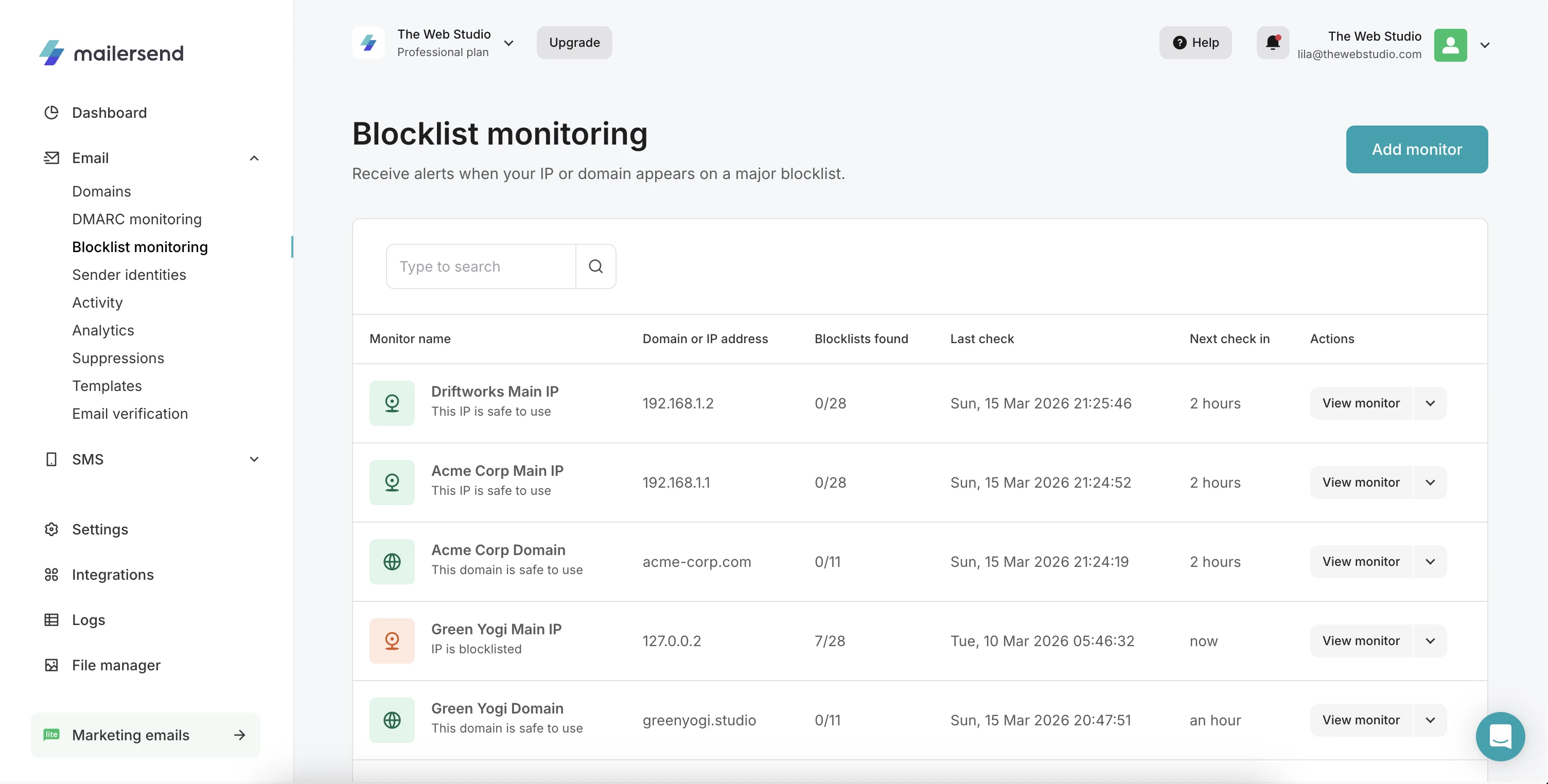
Deliverability tools: Managing your clients’ email also involves managing their deliverability, so additional tools that make this easier are a big plus. Look for tools such as email verification, DMARC monitoring and blocklist monitoring that will give you deeper insights into your clients’ account health and allow you to take action fast if an issue arises.
Intuitive, well-documented API: A good email API with endpoints for all features and data will give your agency the power to integrate fast as well as create complete, white-label dashboards for clients. Give clients access to real-time activity insights, analytics reports, and even the ability to send emails.
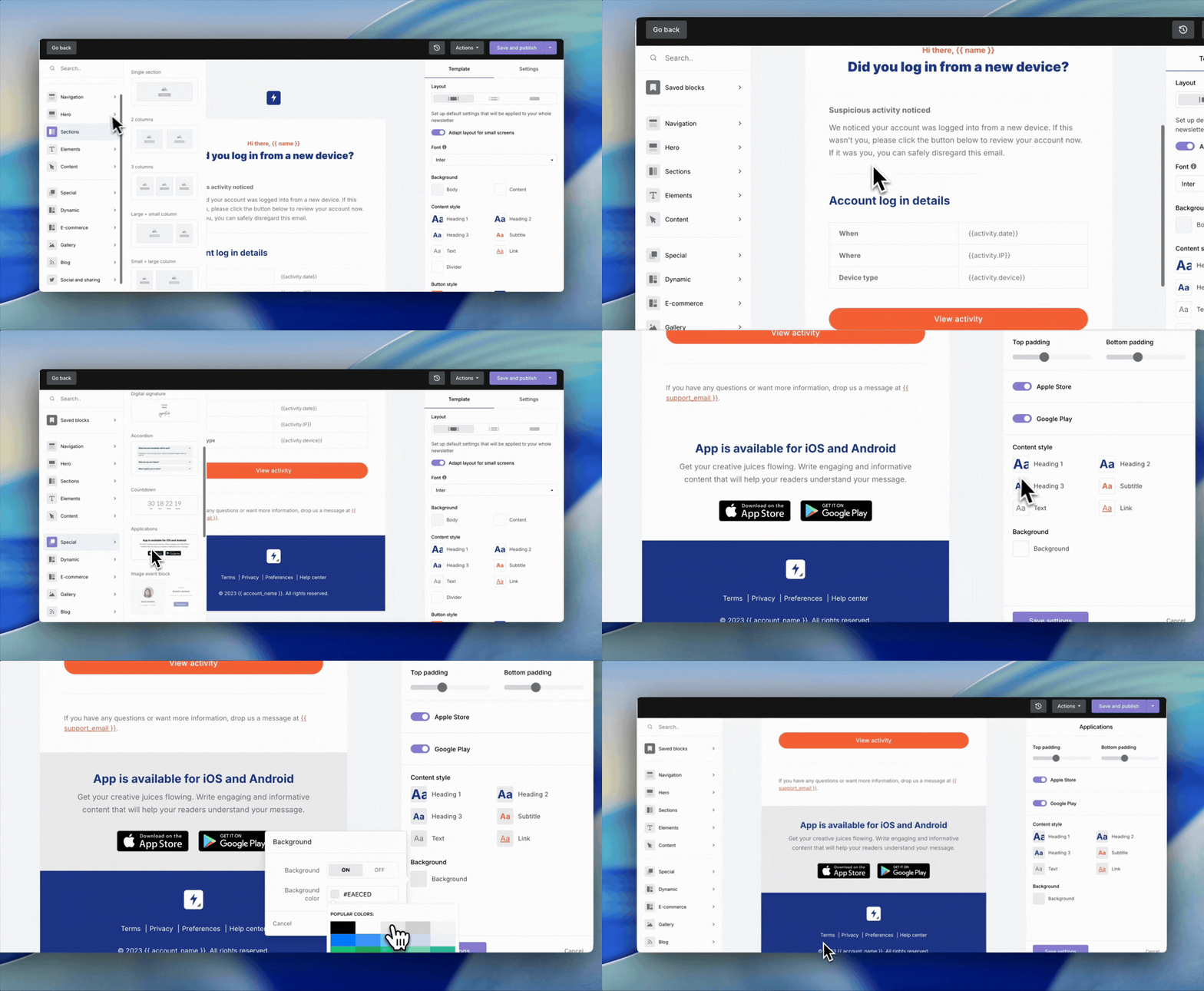
User-friendly app and template builders: Quick adoption with minimal learning curve is crucial for any agency application. Look for a platform that’s easy to use and navigate and offers advanced template creation abilities so that non-technical team members can easily design professional, responsive emails.
Webhooks, logs and activity: These will give you maximum operational visibility over your clients’ API and sending activity, giving you the ability to troubleshoot and fix issues fast.
Support: Look for a tool that has a reputation for providing good support via multiple channels, as well as access to a customer success manager who will help your agency grow.
Service Level Agreement (SLA): Transactional messaging is critical to your clients’ business operations and customer experience. A reliable solution with a guaranteed uptime is essential to ensure their transactional email runs smoothly, allowing you to implement it with confidence.
Flexible, volume-based pricing: Per-tenant pricing can quickly become expensive, especially if you have a high number of clients who send low volumes of emails. Volume-based pricing takes into consideration your agency account’s entire sending volume, so you can benefit from low plan costs while pricing clients appropriately based on their usage. This also allows you to provide a more affordable service for low-volume senders. What’s more, a platform that allows you to customize your plan with add-ons like additional domains and deliverability services gives you the flexibility to offer the services your clients need as they need them.
Data privacy and compliance: A platform that is GDPR compliant and complies with regional privacy laws is essential when handling email data for clients. Stick with solutions that provide data processing agreements, EU data hosting, and data retention controls.
2. Create a standard onboarding process
Developing and documenting a repeatable outline for how to onboard clients early on will make it easier to scale as your client list grows. Plus, it will make it much more painless when it comes to knowledge sharing with new team members.
Basic onboarding steps when using MailerSend could look like this:
1. Add the new client’s sending domain and configure their authentication records or create the client’s sender identity.
2. Generate the unique API keys or SMTP credentials for the client’s domain.
3. Create any necessary templates for the client’s domain.
4. Use the API or SMTP to integrate MailerSend with the client’s app or website. Ensure that you are using the correct tags and custom tracking codes. Set sending limits if needed and use unique webhook endpoints for tracking and deliverability monitoring.
5. Add the client’s domains and IPs to the DMARC and blocklist monitoring tools.
5. Give team members necessary access with roles or custom permissions. If needed, give the client access to their domain only and the necessary features/settings.
3. Create a template framework
Optimize the process of creating new templates for every client by creating a standard framework of templates that can be copied for each client to customize. Include the most popular types of transactional emails:
One-time password
You can also create frameworks for different types of clients, like e-commerce, hospitality, services, or SaaS. When a new client is onboarded, simply copy the relevant templates and apply them to the client’s domain so they can be customized with their branding and copy.
4. Monitor deliverability for each client
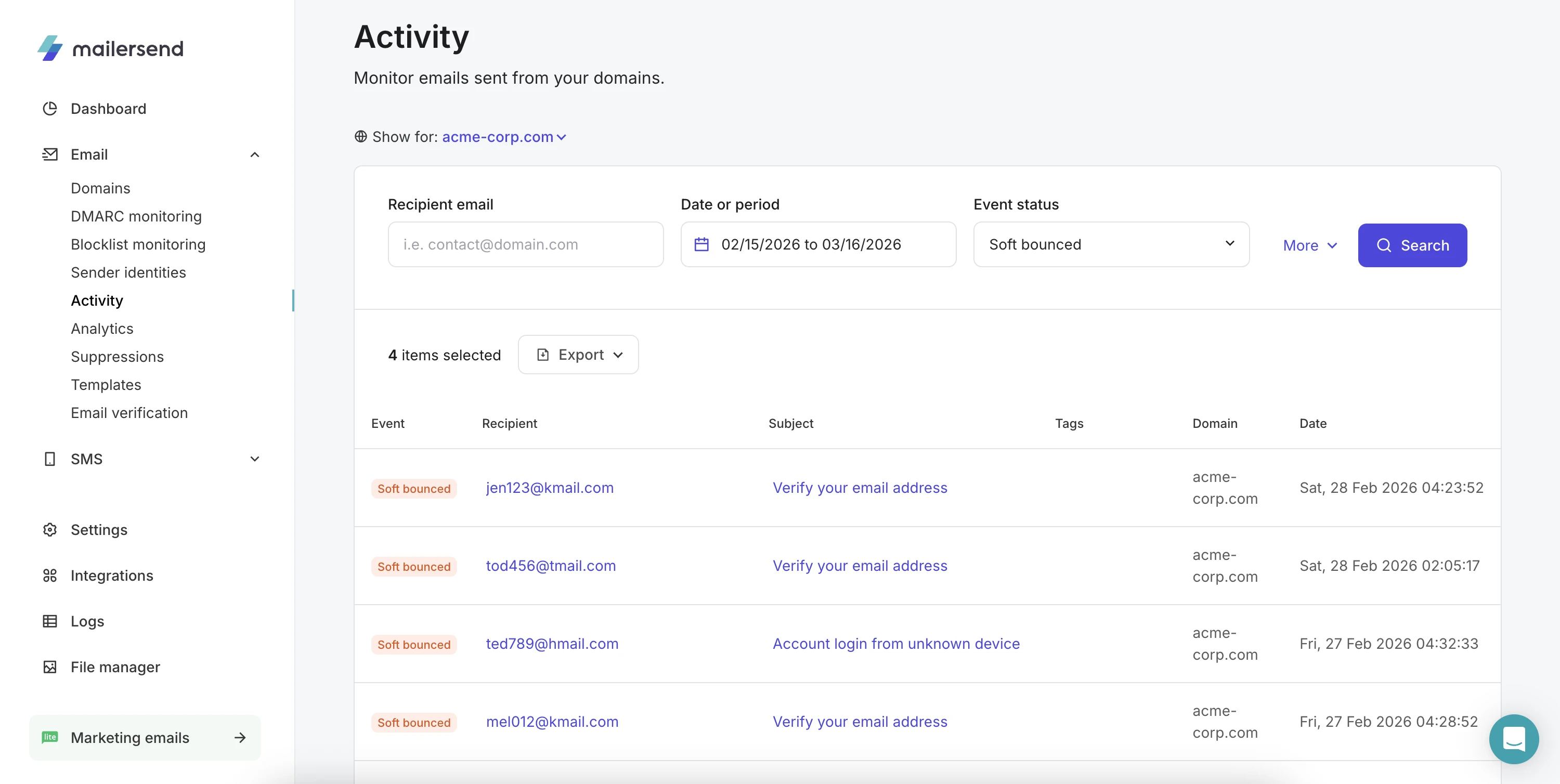
You’ll need to track a range of email events for your clients’ transactional emails. MailerSend will begin tracking these events automatically, and they are visible on the Activity page, filtered by domain for each client.
But for enhanced monitoring, you should use webhooks to get real-time HTTP notifications about specific events, which can then trigger a workflow or alert you to an issue. Each client should have their own unique webhook endpoints or custom tracking tags so that activity data is kept separate.
Agencies should track each client’s:
Soft and hard bounces
Deferrals
Open rate
Domain reputation
DMARC reports and domains activity
Blocklist activity
Get started with MailerSend today
Sign up for free and start sending in minutes to test out MailerSend's reliable sending infrastructure, then upgrade to a Professional plan to get unlimited domains for your clients' emails.
Advanced strategies and best practices
Once your agency has a multi-tenant workflow in place, it’s time to optimize for long-term scalability and efficiency, while maintaining strong deliverability.
1. Automate your onboarding workflow
As the number of clients grows and you’ve refined your onboarding process, you can automate parts of the workflow to bypass manual setup. For example, you could create an automation triggered by adding a domain, which creates and verifies the domain and then automatically generates an API key or adds the domain as a DMARC monitor. Minimizing multiple steps into one will help to reduce onboarding time for account creators and ensure all necessary steps are carried out.
2. Implement safeguards to avoid damage to reputation
When you’re onboarding new clients with fresh domains, you’ll need to carry out a proper domain warm-up to prevent rate limiting or inbox rejection.
You’ll also want to put safeguards in place to prevent abuse and properly handle sudden spikes in email traffic. This is because, even if a domain is warmed up and has a good sending history, a sudden, uncharacteristic spike will catch the attention of mailbox providers, who would consider the activity to be suspicious. To prevent this, agencies can follow these best practices:
Use rate-limiting, queues and backoff mechanisms to control email spikes and handle rate-limiting imposed by mailbox providers
Use DMARC enforcement and monitoring to prevent unauthorized sendings from reaching recipients
Monitor activity and domain reputation to quickly catch issues before they impact deliverability
Automatically flag unusual sending patterns, high bounce rates and high spam complaint rates
3. Use DMARC monitoring
DMARC monitoring involves adding a DMARC record to your client’s domain and then receiving reports from mailbox providers about delivery attempts. By implementing a record, you can also enforce a DMARC policy, which tells receiving servers what to do if the message doesn’t pass DMARC authentication. This allows you to prevent unauthorized sendings from being delivered, protecting your domain reputation and recipients from spam.
Aside from this, DMARC reporting gives you full visibility into a domain’s sending activity. This makes it an effective resource for agencies troubleshooting their clients’ sending issues and monitoring their deliverability.
4. Set up blocklist monitoring
Email blocklists are databases of domains, IPs and servers that are known to or are suspected of carrying out malicious sending behavior. Mailbox providers, spam filters and other organizations use blocklists to block any incoming emails from the listed sending sources.
While blocklists are used to block spam and phishing emails, legitimate senders sometimes get blocklisted too. To provide the best protection for your clients, a proactive approach to blocklist monitoring is most effective.
It allows you to add your clients’ domains and IPs to perform automated checks against popular blocklists. If a listing is found? You’ll get an immediate notification with suggestions on how to resolve the listing before it impacts deliverability.
5. Create white-label dashboards
Rather than creating reports or providing updates to clients, you can create your own dashboards to provide performance metrics and analytics for each client account. As well as improving account visibility for clients, you can also offer these white-label products as value add-ons to your agency’s transactional email offering.
6. Build real-time email verification workflows
Take another proactive step toward better deliverability by integrating real-time email validation into your clients’ apps and websites. This will ensure only real, deliverable email addresses are submitted for account creation and other initiatives, maintaining the integrity of their recipient and user lists while also protecting their deliverability.
7. Keep transactional and marketing emails separate
Unlike email marketing campaigns, transactional emails are sent programmatically, triggered by specific actions like purchases, account signups, and password resets. They are functional and critical for business operations and user experience.
That’s why keeping transactional emails and marketing emails separate is the best approach. Not only are the infrastructures optimized for the delivery of each, but it also helps mailbox providers to distinguish between the two types, ensuring that transactional messages land in the inbox rather than in promotions.
8. Implement automated suppression management
Handling bounced emails, spam complaints and unsubscribes is crucial to maintaining good sending practices, complying with privacy regulations, and ensuring good deliverability for clients. This means automatically suppressing these email addresses at the domain level for each client, so you prevent repeated delivery attempts.
9. Take steps to secure your API keys
API keys are the lock and key your clients’ apps use to send emails through your account. They are what allow the correct organizations access and keep everyone else out. Proper API key management is essential to maintain security, prevent cross-client data exposure, and isolate sending activity. It’s important for agencies to:
Use separate API keys for each client: Not only does this minimize the chances of exposure, but if one key is compromised, only a single client will be affected, rather than many. Plus, since activity can be tied to API keys, it makes monitoring easier
Apply least-privilege permissions: Only grant API keys the permissions required for their use case to ensure their capabilities are limited
Separate production and staging environments: Never use production API keys for testing and development
Rotate API keys: Periodically create new API keys and update your clients’ applications to use the new keys while revoking the old ones
Store API keys securely: Never hard-code API tokens. Instead, use environment variables and secret management tools
How to price transactional email as a service
With multi-tenant systems that use volume-based pricing, it’s typical for the agency to absorb the platform cost and charge clients based on implementation, usage, monitoring, maintenance, and support. The most effective approach is a combination of project-based fees and monthly retainers: the initial setup incurs a one-off fee followed by a monthly retainer that covers usage, maintenance and support.
When it comes to pricing usage, using a set, tiered pricing structure helps to minimize complexity and keep pricing fair for all clients while also offering an incentive for growth. Here’s an example:
Up to 5,000 emails/month: $2.50/1,000
5,001-10,000 emails/month: $2.40/1,000
10,001-25,000 emails/month: $2.20/1,000
25,001-50,000/month: $2.00/1,000
50,001-100,000/month: $1.80/1,000
100,001-250,000/month: $1.50/1,000
250,001-500,000/month: $1.10/1,000
This kind of pricing structure gives clients the benefit of paying less per email as their product grows while still enabling agencies to increase their total revenue and maintain healthy margins.
FAQs
How do I prevent one client’s poor deliverability from affecting my other clients?
By adding clients’ domains, domain reputation can be kept separate so the sending activity of one client won’t affect the rest. However, a proactive approach to monitoring and maintaining deliverability is crucial for agencies. Agencies need to maintain high deliverability standards, and monitor bounces regularly to ensure there is no escalation and potential issues are addressed. Plus, you should regularly verify your clients’ recipient lists to remove invalid emails.
What’s more, the Professional plan gives you more visibility into sending activity, API requests and more with Logs and DMARC and blocklist monitoring features.
Can I manage multiple client domains under a single MailerSend account?
Yes, Starter plans and above can add multiple domains, with our Professional plan designed for agencies, including unlimited domains.
How can I give clients access to their own analytics without seeing my other accounts?
Customers can be assigned custom roles with specific access to only their own domains. This ensures they only see the activity and analytics of that sending domain and cannot access any other client’s data.
Is it possible to automate the onboarding of new client domains via API?
Yes, you can add and verify a domain via the API and create and invite a new user via API. Everything else is possible via API. Check out our API reference to learn more about what you can do with the MailerSend API.
What is the difference between using sub-accounts and separate sending domains?
Using separate sending domains isolates your clients’ sending while using a single infrastructure on the master account. Each domain and its settings is kept separate, while still allowing for fast, simple setup and onboarding, easier centralized management, and lower operational costs and complexity. On the other hand, sub-accounts create fully separated environments, often with unique subscriptions and billing periods. They are suited to a slightly different use case in which complete isolation is necessary, and they are usually more complex to manage and onboard.
How do I track monthly email volume for individual clients to handle rebilling?
You can easily fetch individual email activity data with our Analytics endpoint (by filtering the time period you want and the domain).
Can I use dedicated IPs to isolate the reputation of high-volume agency clients?
Yes, we offer dedicated IP addresses to accounts with a minimum volume of 50K emails/week. Contact our support team if you’d like to discuss getting a dedicated IP.
How does DMARC monitoring help me manage security for my agency’s clients?
DMARC monitoring helps secure client sending in 2 ways:
It allows you to implement a DMARC record with a policy that will reject delivery of emails sent with your domain if the message does not pass authentication checks
It allows you to receive DMARC reports from mailbox providers and gives you insights into all sending activity so that you can identify authentication issues as well as unauthorized sending sources
What happens to my agency reputation if a client gets added to a blocklist?
If you are managing your clients’ email by adding their domains, they will not be impacted if one client is added to a blocklist. Only the blocklisted domain is affected, and its deliverability may be impacted until it is delisted.
We recommend using our blocklist monitoring feature to get real-time updates about blocklist appearances. Here, you'll find specific instructions on how to be removed from the blocklist.