IP vs. domain reputation: Why domains matter more in 2026

IP and domain reputation have long been leading factors that mailbox providers and internet service providers (ISPs) rely on for determining the trustworthiness of senders. Historically, IP reputation had the bigger sway, making it much easier for newer senders to get started and regular senders to deal with sudden surges in traffic.
But with the introduction of stronger authentication standards and the enforcement of domain verification as a baseline, Mailbox providers are placing more importance on domain reputation. This means that more careful consideration and strategy are needed, especially when scaling sending and handling spikes in email volume.
In this article, we’ll break down what mailbox providers are looking for and why, and give you the best practices, strategy, and tips from our deliverability experts to establish a strong email domain reputation.
Let’s talk about email reputation
Sender reputation, domain reputation, IP reputation… They all impact deliverability, but they’re all slightly different. Here’s a quick breakdown:
Sender reputation
Sender reputation is used to talk about the overall trust score that mailbox providers assign to senders. Your sender reputation is determined by a combination of signals, including:
IP reputation
Domain reputation
SPF, DKIM and DMARC alignment
Engagement with your emails (opens, clicks, replies, etc.)
Bounce rate
Spam complaint rate
Recipient list quality
Sending patterns and consistency
IP reputation
IP reputation is tied to sending infrastructure and is the trust score specifically assigned to the sending IP address (which can be shared or dedicated). IP reputation is impacted by:
Bounce rate
Spam complaint rate
Spam traps
Being blocklisted
Previous abuse activity
Sending patterns and consistency
Reputation of the domains sending emails from the IP
Domain reputation
Domain reputation is the trust score assigned to the authenticated sending domain, including the From domain, DKIM signing domain and DMARC alignment. Similar to IP reputation, domain reputation is impacted by bounce rate, spam complaints, being blocklisted, previous abuse activity, engagement metrics, and sending patterns. It’s also impacted by:
IP reputation
Authentication compliance
DMARC enforcement
Brand-level trust signals
So, a strong email domain reputation + good IP reputation + healthy sending practices and good engagement is the recipe for maximal inbox placement. This isn’t new information. However, where a very strong IP reputation could balance out a less-than-stellar domain reputation before, domain reputation now plays a much more pivotal role, in some cases, outweighing IP reputation.
Plus, what makes maintaining domain reputation even more important is that it’s tied to the domain you own—your digital identity. If it takes a hit, there is no moving on to the next domain (like you can with a sending IP address).
Why the shift toward domain reputation?
Considering mailbox providers’ (like Gmail and Yahoo) push for proper authentication as well as DMARC implementation for senders of over 5,000 emails per day, a stronger focus on domain reputation makes a lot of sense.
Domain authentication is now a standard requirement for email senders, allowing mailbox providers to differentiate between senders on shared IPs. It’s much easier to determine exactly who the email is coming from, even when a shared IP is being used, meaning that restrictions can be placed on individual senders without impacting other domains using the same IP.
And since it’s not as easy to switch between sending domains as it is sending IPs and services, the focus on domain reputation makes it more difficult for spammers to get their messages delivered.
So what does this mean for senders?
With the increasing focus on domain reputation, one thing becomes very clear: your domain needs a history. And a “good” history at that; if it’s inconsistent or there’s little data to go on, you’re basically starting from scratch, even if you’re a real sender following best practices and guidelines.
It’s essential to carry out proper domain warming, just as you would IP warming, by starting out sending a low, consistent volume of emails and gradually building up. But it’s also important to plan and adjust your strategy for sudden increased email traffic, as this is one of the easiest ways for legitimate senders to face email deliverability issues.
The risk of email spikes
Sending low volumes of emails consistently helps to establish a pattern and history for typical sending. But disrupting that pattern with a significant spike in email traffic can raise red flags for mailbox providers. A sudden and extreme increase would be considered an anomaly and could indicate a compromised account, spam campaigns, or other abuse of the domain.
As a result, if your domain has a history of sending relatively low volumes of emails, then “out-of-character”, high-volume events are likely to cause mailbox providers to treat your domain as it were an unwarmed IP, leading to rate limiting, throttling and rejected emails.
This isn’t a bad thing! It helps to prevent your domain from being abused and protects recipients from spam and phishing attempts. But sometimes there are legitimate reasons for low-volume senders to suddenly send out a very high volume of emails, for example, sending out a bulk notification to all customers. And this is why strategic bulk sending is necessary, so you can prevent your emails from being flagged by mailbox providers and avoid damage to your domain reputation.
Building a domain strategy for long-term deliverability
Getting your emails to land can sometimes feel like a game you need to play with mailbox providers, and the rules are always changing. But at its core, deliverability and domain reputation are all about trust, and there are proven steps you can take to develop a good reputation and maintain it, even when your sendings experience unpredictable spikes.
Follow these best practices, and you’ll build a solid domain reputation that ensures lasting email deliverability.
1. Implement proper opt-in/unsubscribe practices
Confirmed opt-in is a simple concept, but it’s an incredibly effective way to protect email domain reputation. Plus, it helps you to stay compliant with regulations such as the GDPR and CAN-SPAM Act.
Confirmed opt-in reduces early complaints, which disproportionately influence domain reputation in the first weeks of sending. It also drives the good engagement rates that are the signals essential for establishing provider trust. Warmup success is strongly correlated with proper opt-in practices.
To ensure you’re following best practices:
Use double (confirmed) opt-in: This prevents invalid emails from being added to your list and ensures real consent
Set clear expectations about your communication
Do not use any hidden or pre-ticked consent boxes
Capture proof of consent data, such as IP address, timestamp, signup source, and consent given
Make it easy to unsubscribe with one-click unsubscribe links, immediate processing, and visible unsubscribe buttons
2. Properly warm up sending domains
You’ve heard of IP warm-up; now we’re in the era of domain warm-up. It involves increasing sending volume slowly and is an official Google guideline for email senders. Google’s recommendations include:
Sending at a consistent rate and avoiding email bursts
Starting with a low sending volume to engaged users and gradually increasing the volume over time
Avoiding sudden volume spikes if your domain does not have a history of such volumes
During the warm-up, regularly monitor server responses, spam complaints and domain reputation so you can make adjustments if necessary
Domain warm-up should be carried out for all new sending domains and existing domains when preparing for an email spike. However, if you’ll be sending low volumes of emails (in the range of 50-200 emails per day), a dedicated warmup strategy is less critical, as it happens naturally for these numbers.
Warm-up schedule suggestion
Here is a solid, practical domain warm-up schedule you can follow if you’re starting out with a domain that already has a sending history. This example works toward a high-volume target of 100k-250k emails per day, but you can adjust the number proportionally based on your own sending needs.
First, here are some important details to keep in mind:
1. The proper authentication protocols should be in place for your domain: SPF, DKIM and DMARC.
2. Your recipient list should be segmented by engagement (as the warm-up requires starting out sending to engaged recipients only).
3. Your spam complaint rate should stay below 0.1%.
4. Your hard bounce rate should stay below 2%.
5. You’ll need to monitor activity, deliverability and reputation daily via your email service provider (ESP) and Google Postmaster.
6. If engagement drops, you are rate limited, or deferrals increase, put a freeze on volume increase until you have a handle on it.
7. Keep volume flat throughout each day and avoid sudden spikes. Mailbox providers also monitor hourly rate and email bursts, as well as daily volume.
Day 1-2 | Day 3-4 | Day 5-7 | |
Week 1Send to engaged recipients from the past 14 days | 1,000-2,000 per day | 3,000-5,000 per day | 6,000-8,000 per day |
Week 2Begin expanding the recipient segment to those who have engaged in the last 30-60 days. However, you should only continue increasing volume if you experience no rate limiting and spam complaint rate has remained stable. | 9,000-12,000 per day | 14,000-17,000 per day | 19,000-24,000 per day |
Week 3Again, if you haven’t faced rate limiting or increased spam complaints, continue to increase volume. At this point, you can begin to introduce recipients who engaged in the last 60-90 days. | 28,000-32,000 per day | 35,000-40,000 per day | 45,000-50,000 per day |
Week 4If monitoring hasn’t highlighted any issues, continue scaling. | 55,000-65,000 per day | 70,000-80,000 per day | 90,000-100,000 per day |
Weeks 5-6
At this point, you would have built up a steady behavioral history for your domain that shows consistent engagement and predictable sending patterns. If necessary, you can continue scaling your volume gradually toward 200,000 emails per day or beyond.
Once you’ve established a typical, steady sending cadence with stable inbox placement, a low spam complaint rate, no or minimal 421 deferrals, and no rate limiting, you can begin to include less engaged recipients.
3. Monitor activity and domain reputation
By actively monitoring your sendings, reputation and any activity that could affect deliverability rate (such as bounces and spam complaints), you can troubleshoot easier and act fast to address issues before they impact your domain reputation.
Google’s Postmaster Tools is a free resource that allows you to monitor your verified domains, with insights such as domain reputation score, compliance status, spam complaints and email delivery errors.
If you’re a MailerSend user, there are numerous features available to give you visibility into your sendings, reputation and domain activity. Starting with the dashboard, you can get a quick overview of open rate, bounce rate, click rate and account reputation.
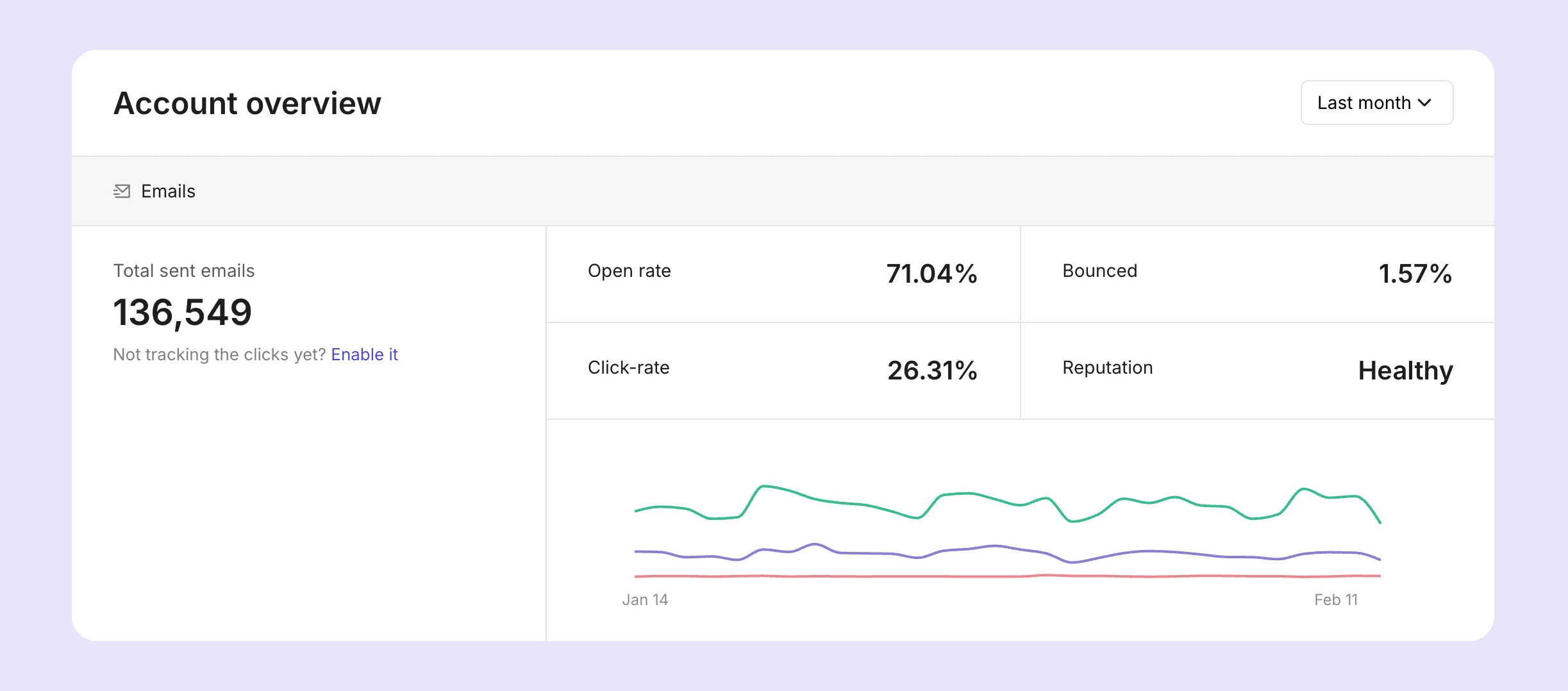
The Emails tab allows you to view the complete journey of every single email, from processed to delivered, opened, and clicked. You can also view unsubscribes, spam complaints, bounces and deferrals. Plus, there are various filters available to narrow down your search and locate specific emails or events.
Click on an email, and you can view more information, including the exact reason why the message was bounced or deferred.
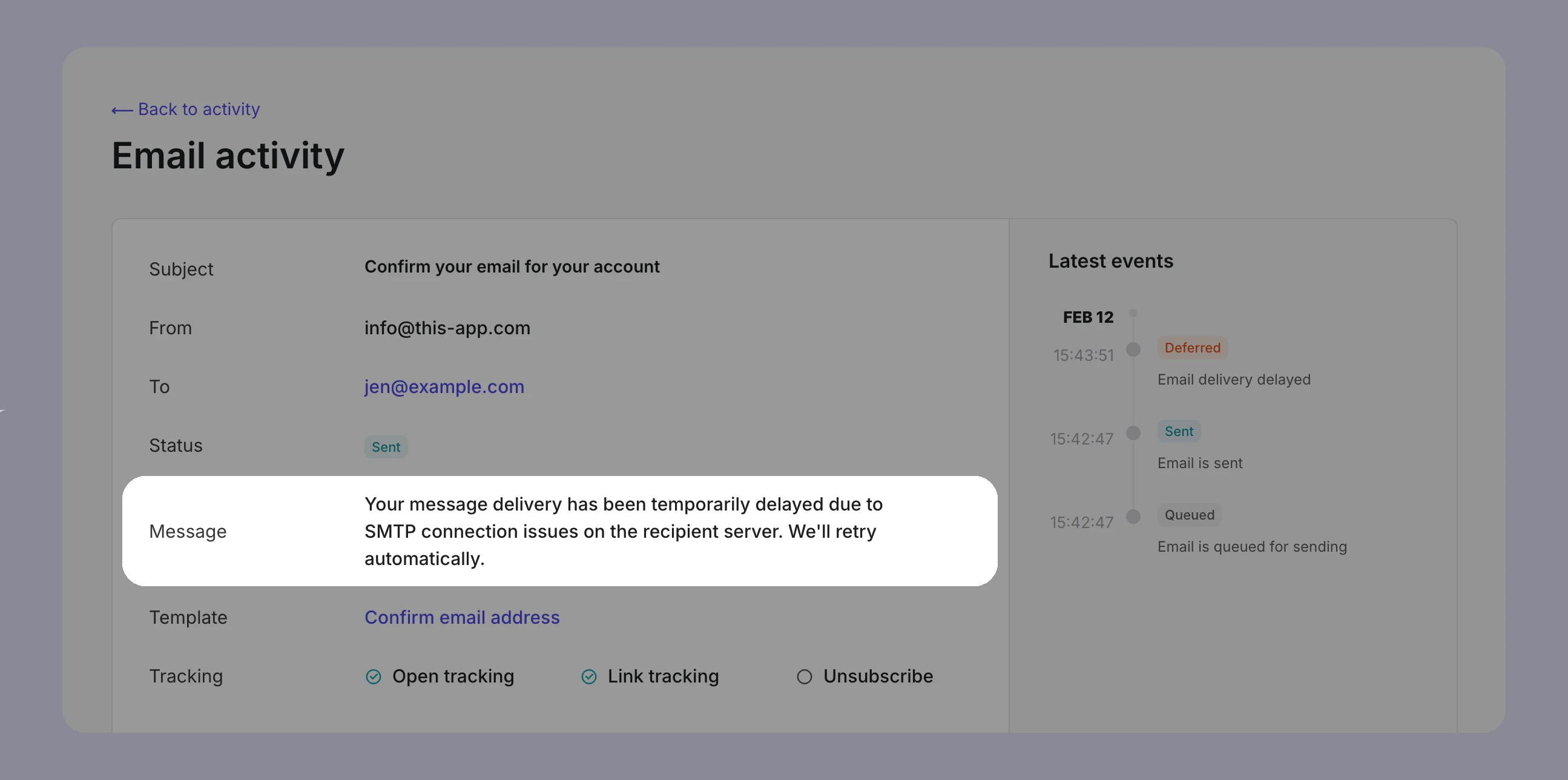
You can also trigger notifications and workflows based on activity events with webhooks. For example, you could create a workflow that monitors deferrals for Gmail addresses, and if the number of deferrals surpasses a limit (indicating rate limiting by Gmail), automatically reduce the send rate and queue remaining emails.
4. DMARC enforcement and monitoring
As of February 2024, DMARC implementation is a mandatory requirement of mailbox providers like Gmail and Yahoo for senders of over 5,000 emails per day. And while senders of less than this aren’t required to have DMARC added to their domain’s DNS, it’s highly recommended to prevent domain spoofing and to get DMARC reports.
When properly configured, DMARC is a win for everyone: it protects your recipients from spam and email abuse, and it protects your domain reputation from harm by rejecting or quarantining emails without correct domain alignment. Spoofers can try to use your domain name, but they’ll be blocked when alignment fails.
DMARC enforcement signals to mailbox providers that you are serious about email security and a trustworthy sender, which contributes to a strong domain reputation. What’s more, you can use DMARC reports that are sent by providers about your domain activity, to have better visibility into what is actually being sent from your domain, legitimate or otherwise.
With this data, you can identify authentication issues, forgotten third-party platforms, and unauthorized sending sources, and address them before they impact your domain reputation.
With MailerSend, you can create DMARC records and monitor activity from the app, plus get real-time notifications about blocklist activity. We collect the raw XML data from receiving mail servers, and turn them into readable reports where you can quickly see authentication and alignment results, report sources, sending IP address, applied policy, and more.
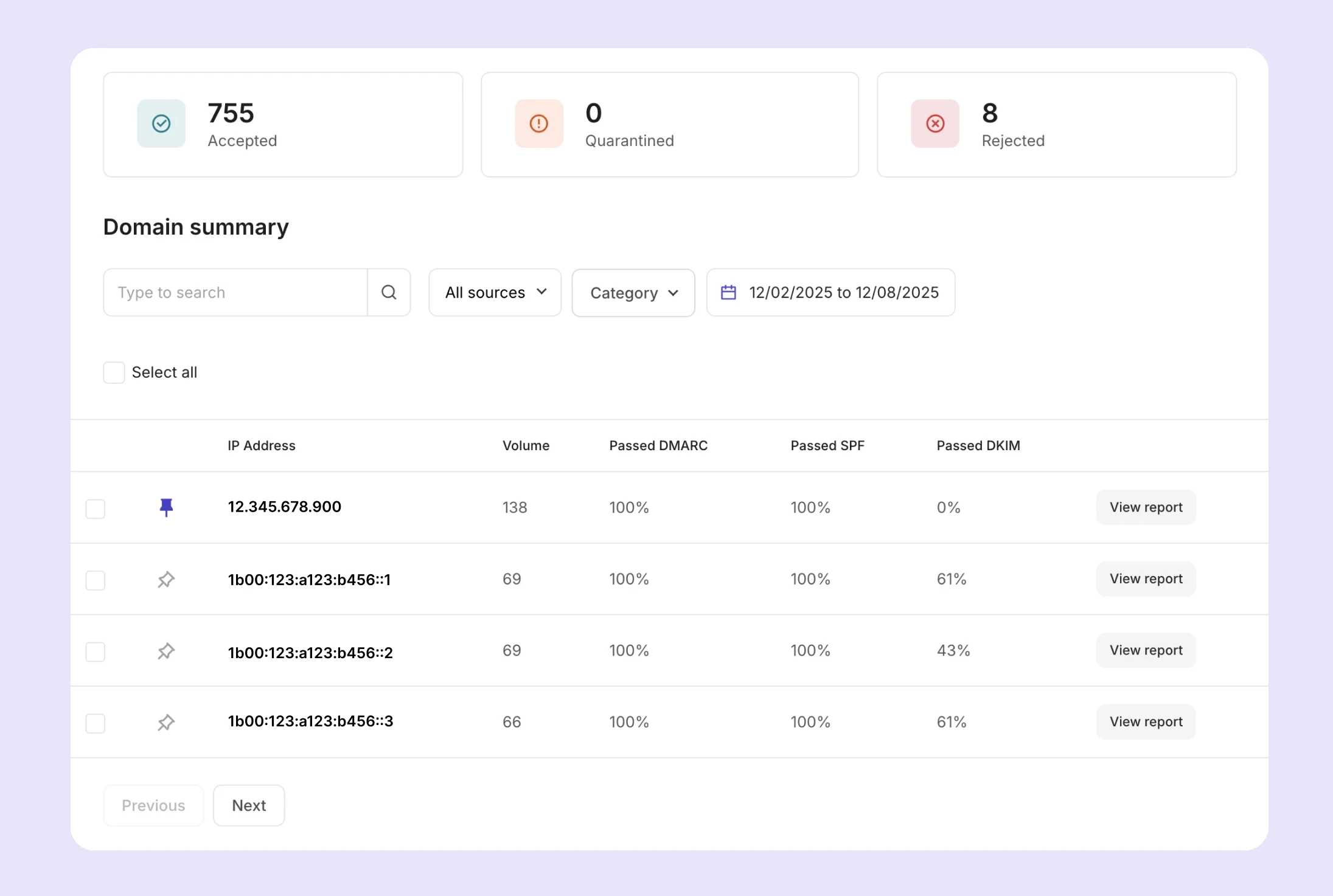
Starter plans can try DMARC monitoring free for 30 days. Professional plans have 10 monitors included, with additional monitors available for $2/domain.
5. Carry out regular blocklist checks
Email blocklists are generally reserved for IPs and domains that are suspected of or known for malicious behavior, but legitimate senders aren’t completely immune to them. Appearing on a domain blocklist can have a significant impact on your reputation and deliverability. The best way to prevent this is to carry out regular blocklist lookups so you can delist any IPs or domains making an appearance.
Some blocklists allow you to search for your domain or IP to see if there are any issues, but the best way to check is to automate the process by using a blocklist monitoring tool. A blocklist monitor will allow you to add your domains and IPs and will perform regular, automated checks for you and alert you to any hits. This means you’ll learn about listed IPs or domains as soon as possible, so you can address the issue and get delisted before your reputation takes a hit.
6. Control email spikes with a staggered approach
If you need to send at least double your typical sending volume, sending everything at once will catch the attention of mailbox providers. To avoid this, you can use a staggered approach to send out batches of emails periodically. This involves using:
API-side batching: For example, instead of sending 100,000 emails at once, use the bulk endpoint to send 5,000 emails, wait 5 minutes, send the next 5,000, and then repeat until all emails have been sent. You can also use the send_at parameter to schedule batches of emails for specific times.
Queuing and backoff mechanism: Push outgoing emails to a queue and configure workers to process a limited number of emails per minute. If deferrals increase, enable a backoff mechanism to slow down sending.
Backoff on 4xx responses: Configure your setup so that if you start receiving 4.7.28 rate-limiting errors or an increase in 421 deferrals, concurrency is reduced, send rate is slowed down, and retries are done carefully and gradually.
Use the Precedence: Bulk header: The Precedence: Bulk header lets Gmail know that your email was intentionally sent to multiple recipients, and helps prevent it from being delivered to the spam folder. You can enable the header in MailerSend by going to your domain’s settings > Advanced settings > click More settings > enable the Add precedence bulk header option.
7. Consider using a dedicated IP
If you’re a high-volume sender (with consistently high, predictable sending), and you closely monitor deliverability, bounces, and spam complaints, then a dedicated IP could be an effective way to have more control over your overall reputation and deliverability. But it’s not a shortcut: dedicated IPs are a good idea if you are scaling steadily and want IP independence. They’re not a quick fix for reputation issues or inconsistent sending.
If you’re interested in getting a dedicated IP for your MailerSend account, check out our guide to learn more and get in touch with our customer support team.
Domain reputation leads modern deliverability
With great power comes great responsibility. More focus on domain reputation gives you greater control over your deliverability, but it removes the safety net of shared infrastructure, requiring consistency, proactive monitoring, and a forward-thinking strategy.
In a domain-first era, you need to build carefully, scale intentionally, and treat your domain as the identity of your email system.