What is a DMARC record and why your domain needs one

SPF (Sender Policy Framework) and DKIM (DomainKeys Identified Mail) have long been the standard of email authentication methods, with DMARC records being the optional authentication add-on that many senders forgo. But as email spoofing techniques become more advanced, DMARC has been adopted by mailbox providers as a non-negotiable requirement if you want your emails to reach inboxes.
In this guide, we’ll cover what DMARC is and how it works, the guidelines and requirements implemented by major mailbox providers, and what you can do with DMARC for better monitoring and security.
What is a DMARC record?
A DMARC record is a TXT record that you add to your domain’s DNS (Domain Name System) to enforce DMARC. DMARC stands for Domain-based Message Authentication, Reporting, and Conformance. It’s an email authentication protocol that allows domain owners to set policies that define how emails sent from their domain are handled, and receive reports from mailbox providers about all of the domain’s sending activity.
DMARC records work alongside DKIM and SPF records by:
1. Verifying that the SPF and DKIM checks passed.
2. Checking the SPF and DKIM records are aligned with the “From” address domain.
3. Telling the mailbox provider what to do if the email fails SPF and/or DKIM signature authentication.
DMARC is no longer a best practice, but a mandatory requirement
In February 2024, Google and Yahoo introduced new requirements for senders of over 5,000 emails per day. This included the mandatory implementation of SPF, DKIM and DMARC for sending domains. Consequences for non-compliance were fully enforced in November 2025, with any non-compliant emails from bulk senders being temporarily or permanently rejected or sent to spam.
For senders of fewer than 5,000 emails per day, DMARC is still currently optional (SPF and DKIM are mandatory), but it’s still worth implementing for the benefits that DMARC provides.
Other bulk sender requirements include:
The “From” header must be aligned with your authenticated domains
Emails must be sent using TLS encryption
The domain must have valid forward and reverse DNS records
Emails should comply with RFC 5322 email format standards
Email must include a one-click unsubscribe option, and any unsubscribes must be processed within 48 hours
Spam complaint rates should be below 0.3%
These requirements apply to all bulk senders, whether you’re sending internal messages, using a third-party email service, or sending important transactional emails.
So what’s the big deal about DMARC?
One of the main reasons that mailbox providers are placing more importance on DMARC is that it is a major player in the fight against email spoofing.
That’s because DMARC forces the visible “From” address to match authenticated domains. Without it, some inboxes may still accept emails that are sent from unknown sending IP addresses. This results in potential phishing attacks on users, and damage to your domain reputation (and brand). But thanks to DMARC reporting, it can help with more than just keeping your domain secure. Let’s dive a little deeper into why you should be using DMARC.
1. DMARC alignment stops spoofing
For a message to pass a DMARC check, it must first pass SPF or DKIM, and then whichever method passed must be aligned with the “From” address domain. This means that attackers cannot spoof your domain while using their own server to send the email.
2. DMARC records define how unauthorized emails should be handled
When you create a DMARC record, you apply various settings to customize the policy you want to enforce. This means you can tell receiving email servers what to do with spoofed emails. You can configure with the “p” element, and the value can be none: the receiving server does nothing and the activity is monitored, quarantine: the email receiver delivers the email to spam, or reject: the email is blocked.
3. DMARC reports help with deliverability troubleshooting
The reports that mailbox providers send not only reveal any unauthorized use of your domain, but they also can help you identify sending and configuration issues that might impact your email deliverability. DMARC aggregate reports will reveal:
Every server sending email with your domain, including CRMs and third-party email service providers (ESPs)
Unauthorized sources that are spoofing your domain
Any other tools that could be impacting your reputation and deliverability
When you have this kind of visibility into your domain’s entire sending activity, you can more easily identify authentication and alignment failures, and verify that you have configured your authentication correctly across multiple sending sources. You can also more easily identify issues with specific mailbox providers and adjust your strategy as needed.
4. DMARC monitoring is necessary to move toward a stronger DMARC policy
You might imagine that configuring your DMARC policy as p=reject would be the standard configuration, since it would block any email messages that fail authentication checks. And that’s what we want, right? To block any spoofing attempts. But jumping straight in at the deep end can lead to deliverability issues, so it’s common practice to begin with p=none and then move toward a stricter policy after testing.
This allows senders to carry out a monitoring period, so they can fix any issues before moving to p=quarantine and testing again before going full force with p=reject. Rolling out DMARC in this way ensures that you secure your domain without blocking legitimate emails or impacting the user experience and business.
5. DMARC improves deliverability
As well as protecting your domain against spoofers and helping you to identify authentication issues, DMARC is a strong trust signal for mailbox providers like Gmail, Outlook, Yahoo and Apple (even if you don’t send over 5,000 emails a day). Enforced DMARC tells them that the domain owner is serious about email security, they are in control of their infrastructure, and they are actively monitoring and maintaining their domain.
What’s more, as you accumulate high DMARC pass rates and use a stricter policy, your emails will be considered lower risk, ensuring better inbox placement.
6. DMARC sets the groundwork for BIMI
BIMI (Brand Indicators for Message Identification) is an email standard that allows senders to display their logo in the inbox when emails have been authenticated, improving brand recognition, trust, and open rates. For BIMI to work, you must have a DMARC record with a policy of quarantine or reject. This is because BIMI is used to verify that a sender is legitimate, so DMARC authentication is necessary to ensure the sender is authorized to use the domain.
How to configure a DMARC record for your domain
If you’re familiar with managing domains and DNS records, configuring a DMARC record is quick and easy, and there are plenty of tools available to generate the record for you.
Step 1: Ensure that your SPF and DKIM records are configured correctly
DMARC relies on successful SPF and DKIM authentication, and tells receiving servers what to do if they fail.
If you’re using MailerSend, you can find your domain’s SPF and DKIM records when you add your domain or by going to Email > Domains, selecting your domain, and clicking DNS records in the top right-hand corner.
When you add a new domain, you can also use automatic domain verification by connecting to your host and letting MailerSend configure the SPF and DKIM records for you.
Step 2: Create your DMARC policy and record
DMARC records use various tags and values to configure the policy and settings:
DMARC tag | Description | Values | Required |
v | Specifies the DMARC version. | DMARC1 | Yes |
p | Specifies the policy to be used for emails that fail alignment. | none, quarantine, reject | Yes |
sp | The same as the p (policy) tag but defines the policy for subdomains (sp = subdomain policy). | none, quarantine, reject | No |
pct | Specifies the percentage of the senders emails that should be subject to filtering. With the upcoming DMARCbis changes, pct is set to be replaced by t (we cover this in more detail below). | Numerical value from 0 - 100 | No |
ruf | Allows you to specify the email address to which forensic reports should be sent to. | Valid email address | No |
rua | Allows you to specify the email address to which aggregate reports should be sent to. | Valid email address | Technically no (but highly recommended for monitoring) |
aspf | Specifies the SPF alignment mode: relaxed or strict. | r, s | No |
adkim | Specifies the DKIM alignment mode: relaxed or strict. | r, s | No |
fo | Forensic reporting options specify which authentication failures trigger forensic reports. If omitted, it defaults to f=0. 0: When both SPF and DKIM fail, 1: When SPF or DKIM fails, d: When DKIM fails, s: when SPF fails. | 0, 1, d, s | No |
ri | Allows you to set the frequency of reports. If omitted, it defaults to a value of 86,400 seconds (24 hours). | Time interval in seconds. However, this should be exercised with caution as shorter intervals can lead to throttling. | No |
Here’s an example of a standard DMARC record with basic settings:
_dmarc.example-domain.comv=DMARC1; p=none; pct=100; rua=mailto:rua@dmarc.example.comIf you’re using MailerSend:
You can generate and customize your DMARC record in the DMARC monitoring tool. Go to:
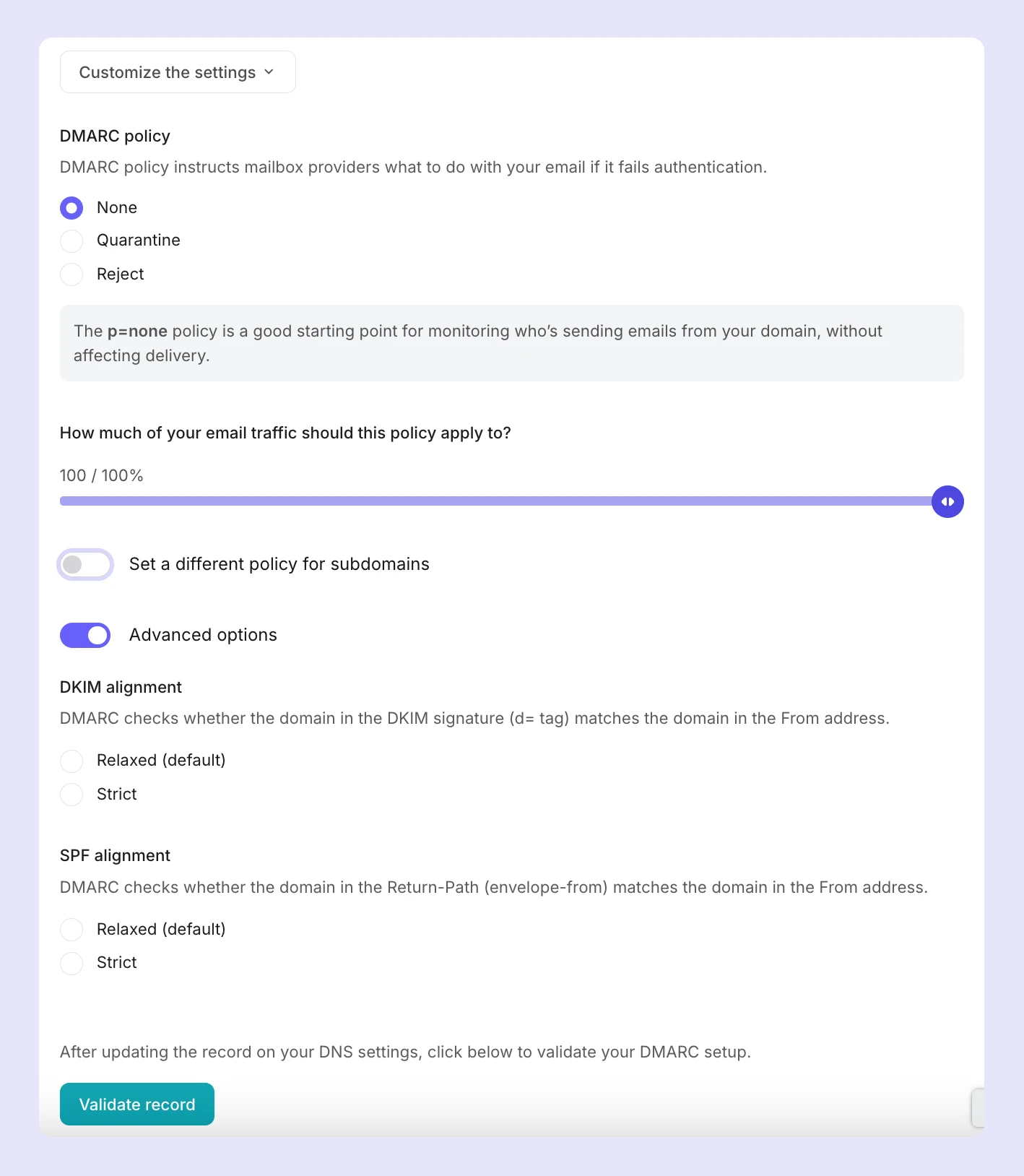
Email > DMARC monitoring and click Monitor domain. Select your domain from the dropdown and you’ll be able to retrieve your DMARC record to add to your domain’s DNS as a TXT record, or customize it first by clicking Customize the settings.
Here, you’ll be able to change the DMARC policy, the percentage of email traffic for the policy to be applied to, add a policy for subdomains, and choose the type of alignment (relaxed or strict) for SPF and DKIM.
Step 3: Publish your DMARC record
Once you’ve created your record, add it as a DNS TXT record for your domain and publish it. In MailerSend, you’ll also want to click Validate record to verify that it has been configured correctly, and start receiving DMARC reports and monitoring your domain’s activity.
How to use DMARC as part of your strategy
Whether you’re sending more than 5,000 daily emails or not, DMARC is an effective way to boost your email security and get access to your entire domain’s sending activity data. Anything that can protect your domain and users, and improve deliverability and troubleshooting, is a win. Here’s a step-by-step approach to how you can get started with and evolve your DMARC strategy.
Phase 1: Strategic monitoring
When you’re starting out with DMARC, the main goal is to collect as much data as possible about the sending sources that are using your domain by setting the policy as p=none. This will allow you to receive reports from receiving mail servers so you can:
Identify all of your legitimate sending sources and catch any potential issues, such as SPF/DKIM misalignment, that may be impacting your deliverability
Identify any outdated tools or portals that no longer should have access to your domain
Highlight unknown or suspicious senders that are spoofing your domain
You can then plan how to begin enforcing a stricter DMARC policy and protecting your domain without your deliverability taking a hit.
By the time you’ve completed the monitoring phase, you should have a complete list of legitimate and malicious sending sources and have addressed any SPF/DKIM alignment issues, resulting in consistently high pass rates for your valid emails.
Phase 2: Begin policy enforcement
When you’re confident that all of your legitimate sending sources have been authenticated, you’ll want to begin introducing protection for your domain with partial enforcement by setting your policy as p=quarantine. This will result in emails that fail DMARC being delivered to the spam folder, allowing you to prevent spoofing and phishing attacks.
At this point, you’re testing the impact of enforcement without your emails being potentially rejected. It’s recommended that you begin enforcing p=quarantine on a low percentage of your emails (using the pct tag) and gradually increase this until the policy is applied to 100% of your emails while maintaining high pass rates for your valid emails.
During testing, look out for drops in inbox placement of your legitimate email traffic, and fix any remaining alignment issues that are causing the failures. Before moving forward, your valid emails should pass DMARC, and you should be confident that enforcement isn’t impacting your users.
Phase 3: Full enforcement
The final phase is to transition to full protection against spoofing and phishing attacks with a policy of p=reject. This ensures that any messages that fail DMARC will be rejected by the mail server. Not only does this protect your domain reputation and users, but it also signals to mailbox providers that you actively maintain your email system for secure sending and compliance.
Since phase 2 helps to identify any remaining alignment issues, moving to full enforcement shouldn’t have any impact on your deliverability. Still, you can start by enforcing p=reject on 50% of email traffic to be sure before moving to full enforcement.
Continued monitoring
Even with a p=reject policy in place, ongoing monitoring of your domain’s sending activity is essential. DMARC reports help you spot anomalies in sending activity early on, allowing you to quickly identify authentication issues, misconfigured sending services, or unexpected changes in email traffic. It can also bring to light deliverability problems tied to specific mailbox providers or geographic locations.
Upcoming DMARC changes: DMARCbis
DMARCbis is the revised protocol being developed by the IETF, and is set to be launched in 2026. It’s sometimes referred to as DMARC 2.0, but don’t let that fool you: the version you use in your record should still be DMARC1. In fact, when DMARCbis is released, it won’t impact existing DMARC records—they are backward compatible and will still function as expected.
The core changes include a clearer specification structure, making DMARC easier to read, implement and maintain, and improved domain discovery that uses a DNS tree walk algorithm instead of relying on an external public suffix list.
There will also be changes to the tags used in DMARC records, with the aim of simplifying and improving them. Here’s what’s changing:
pct (percentage enforcement), rf (failure report format), and ri (report interval) will be deprecated
psd, np, and t will be introduced:
psd will be used to mark public suffix domains
np will allow users to set a policy for non-existent domains
t will replace pct to specify that the record is in testing mode
As spoofing evolves, DMARC is a must
AI-enhanced content is making phishing attacks more difficult to spot. Instead of clearly spammy content full of typos and formatting errors, users are receiving messages that not only look exactly like the real thing, but also use brands’ real domains to be even more convincing. DMARC is an incredibly effective way to ensure emails from unauthorized sources never make it to the inbox.
And when you consider the other deliverability and troubleshooting benefits that DMARC reporting offers, it’s well worth the time and effort to implement a DMARC strategy.
Get started with DMARC monitoring today
Try MailerSend's DMARC monitoring feature free for 30 days with a Starter plan to get enhanced visibility into your domain's activity. Professional plans include monitoring for 10 domains upon signup.