How to warm up an email domain (plus full sending schedule)

If you deliver a high volume of email from a new domain immediately, even from a shared IP address, your emails are likely to hit spam or be rejected.
Fortunately, the process of warming up an account isn’t too hard, although it does take time. Follow this guide to get it done.
What is domain warmup, and why does it matter?
Domain warmup is the process of gradually increasing the number of emails you send from a new or out-of-use domain in order to build trust with email inbox providers and ensure your emails land in the inbox, not the spam folder.
The reason to start sending slowly is to show mailbox providers like Gmail and Outlook that you’re a legitimate sender whose messages generate high engagement. When they see this, they’ll trust you to send even more messages.
On the other hand, if you get a new domain name and instantly blast 10,000 emails on day one, mailbox providers will panic, assume you’re a spammer, and either block you or send your emails straight to spam.
How mailbox providers evaluate a new sending domain
Mailbox providers assign trust scores to each domain based on sending history, bounce rate, engagement, and spam complaints.
If emails sent from your domain get good engagement, your score will go up, as will your chances of reaching the inbox. If they are ignored or marked as spam, they are more likely to land in spam or simply be blocked.
When you start sending from a new domain, inbox providers have zero data they can use to assess the domain, meaning it’s neither fully trusted nor untrusted. Starting slowly and increasing the number of emails you send over time will help you gradually build up the authority you need.
Domain reputation works alongside IP reputation
As well as your domain reputation, mailbox providers and internet service providers (ISPs) use a sender’s IP reputation to determine whether to trust them.
Historically, IP reputation was the more important factor. This meant that you could add new domains to a shared IP and have a good chance that your emails would land in the inbox without having to specifically warm up the sending domain.
But recently, these services have been putting more weight on the domain that is used to send the emails. This is seen through the introduction of stronger authentication standards, such as DMARC, and increased scrutiny of each domain’s sending activity.
For agencies, the importance of domains is both a positive and a challenge. It means you can keep the sending reputation separate for each of your clients; a negative signal on one client won’t impact another.
The downside is that you can’t use the existing reputation of your domain to help new clients when you sign them up. The exception is in the case of sender identities, which we look at later in this article.
You must authenticate your domain before starting the warm-up
Before you start warming your domain, you must follow all the required domain authentication standards.
Adding your SPF and DKIM records is essential for all senders. If you don’t have these set up, your messages will almost certainly go to spam, no matter how slowly you start sending emails. MailerSend automatically handles this when you authenticate a domain with our service, making it pain-free to add multiple sending domains to an account.
We also recommend that you set up a DMARC record that includes your DMARC policy. This tells inbox providers what to do if an email fails SPF or DKIM authentication. Setting up a DMARC record is essential if you send over 5,000 emails a day to either Gmail or Yahoo inboxes.
Even if you don’t send this many emails, setting up DMARC will prevent domain spoofing and get DMARC reports that show your domain’s sending activity, allowing you to quickly identify authentication issues or unauthorized sending sources.
A step-by-step process for warming up your sending domain
Once you’ve set up your domain, it’s ready to start sending. Here is an actionable guide, including a timeline, that you can use to start.
1. Segment your most engaged recipients
Since inbox providers use email engagement as a signal that you're a trusted sender, we recommend maximizing your initial engagement by creating segments with the people who are most likely to open and click on your emails.
Do this, and there’s an extremely high chance that the first emails sent from your domain get good engagement, which will quickly build trust signals in the eyes of inbox providers.
We recommend creating segments for recipients who have engaged by clicking on an email in the past:
14 days
30 days
90 days
Start by sending to people who engaged in the past 14 days, and gradually expand to those who engaged in the last 90.
2. Gradually ramp up volume
It’s important to start with a low sending volume and ramp up slowly until you reach full capacity after around a month.
Bear in mind that there is no set way to ramp up your email sending that will 100% work. The idea is just to gradually and consistently build your sending over a reasonable time frame, making adjustments as necessary, until you’re successfully sending at your target volume.
The schedule below is a good place to start for most senders, but you may choose to be faster or slower depending on your target volume, your list quality and email engagement, and your appetite for risk.
Week 1
Start by sending 1,000 emails a day or fewer to your most engaged recipients. You can then double your emails until you hit 6,000 to 8,000 emails on day six or seven.
Week 2
Now aim to increase sending over the next week up to around 24,000 subscribers. Increase sending at 10% to 20% each day. You can also start sending to people in the less engaged subscriber segments.
During this ramp period, you must pay close attention to your email metrics. Consider scaling back your sending if you see a drop in engagement or an increase in bounce or spam complaint rates.
Your spam complaint rate should always be below 0.1%, and your bounce rate ideally below 0.5% and certainly never above 2%.
Week 3 and 4
Continue to ramp up sending by 10% to 20% each day until you hit your target sending volume. As before, you should track your metrics and scale back if there is a negative move in engagement, spam complaints, or bounces.
Day 1-2 | Day 3-4 | Day 5-7 | |
Week 1Send to most engaged recipients | 1,000-2,000 per day | 3,000-5,000 per day | 6,000-8,000 per day |
Week 2Begin expanding to other recipients. Check your metrics and scale back if bounces or spam complaints increase. | 9,000-12,000 per day | 14,000-17,000 per day | 19,000-24,000 per day |
Week 3Continue to increase volume and send to lesser-engaged subscribers. Monitor issues and scale back if needed. | 28,000-32,000 per day | 35,000-40,000 per day | 45,000-50,000 per day |
Week 4If monitoring hasn’t highlighted any issues, continue scaling. | 55,000-65,000 per day | 70,000-80,000 per day | 90,000-100,000 |
Monitor your metrics
Warming up isn’t the end of the process; you need to keep a positive domain reputation at all times.
Google’s Postmaster Tools allows you to monitor your verified domains, with insights such as domain reputation score, compliance status, spam complaints, and email delivery errors.
You can also check out the stats available in your email sending platform. MailerSend’s analytics dashboard shows an overview of open rate, bounce rate, click rate, and account reputation over time. The line graph ensures it’s easy to identify issues if they occur.
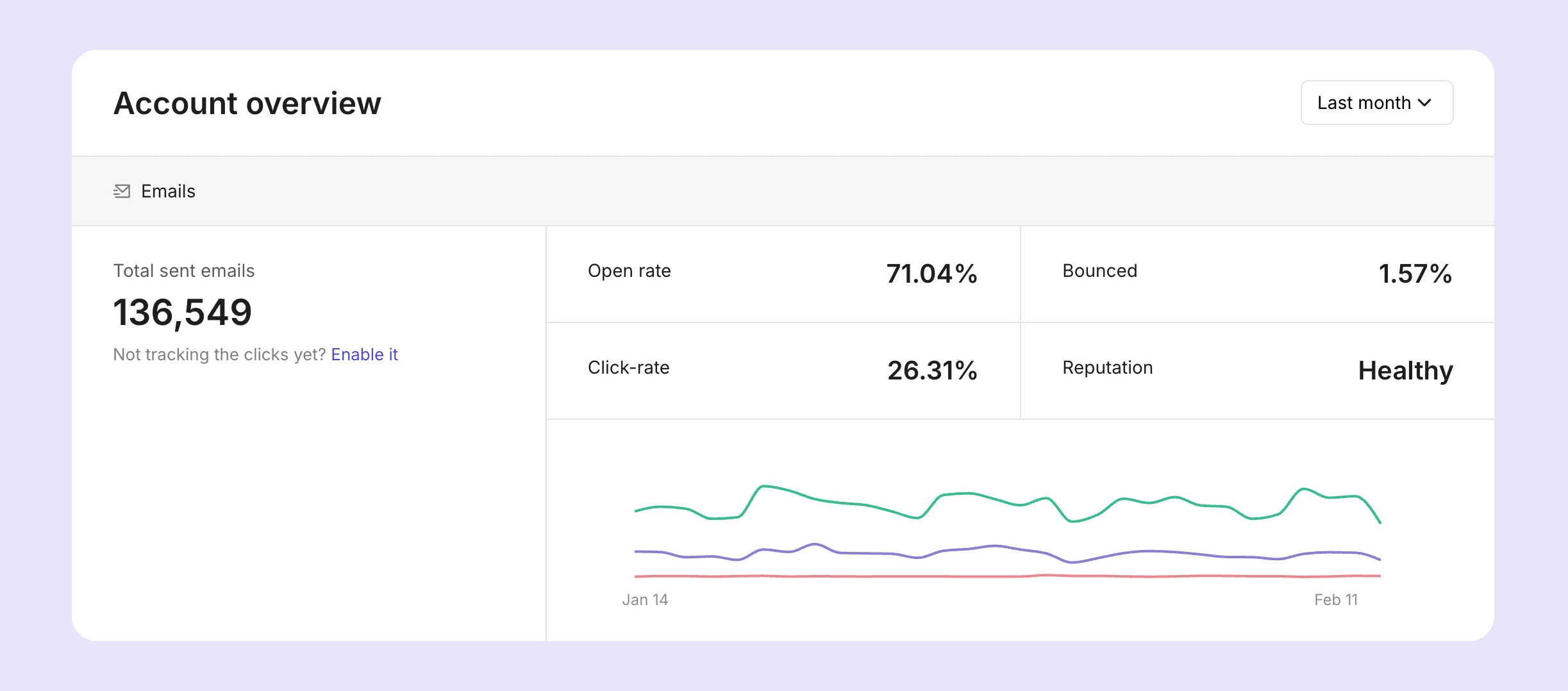
You can also use the Email tab to dive deeper into each email. View the complete journey of every message, from processed to delivered, opened, and clicked, as well as the exact reason why it failed to deliver when relevant. You can also view all your unsubscribes, spam complaints, bounces, and deferrals.
Deferrals are especially important for domain warm. They occur when an email isn't rejected by an inbox, but it instead queued for delivery later. This can happen if the domain is being rate-limited by the mailbox provider, which is another indicator that you should either pause sending or scale back.
If you want real-time alerts, use MailerSend webhooks to create notifications that go out when issues occur. For example, you can also use webhooks to monitor bounce and complaint events in real time so you can take steps to fix the issue before more harm is done.
Keep consistent sending
Once you reach your target volume, continue to send consistently. Inbox providers calculate your domain reputation based on your sending habits over time. If you go for long periods without sending, your reputation may start to suffer, and you should go through the domain warmup process again just to be on the safe side.
You need to warm up subdomains individually
If you want to send from a new subdomain, you need to warm it up as you would with any other new domain. When used for email sending, subdomains are treated as separate but linked domains.
This means that if you’ve built a reputation on examplebiz.com and you want to start sending from newsletter[.]examplebiz[.]com, you’ll have to go through the same warmup process for the new domain.
At the same time, since there is still a link between the two domains, if you start sending spam from newsletter[.]examplebiz[.]com, this will eventually catch up to you, and the root domain examplebiz.com will be impacted.
If you want to keep the domains’ reputations completely separate, consider using totally separate domains.
The SMTP and API warmup path for developers
While the steps above outline a standard domain warmup focused on list segmentation and volume management, developers face a unique set of infrastructure challenges.
If you are integrating email functionality directly into an application via API or SMTP, treating this process like a traditional marketing campaign is a mistake.
While your domain warmup builds a trustworthy reputation for your sending address, an SMTP warmup focuses on the specific pipes delivering those messages. If you dump unthrottled transactional traffic onto a brand-new domain through an unmonitored API connection, target servers will quickly flag your application as a spam risk.
For developers, a successful warmup strategy boils down to two core engineering practices:
1. Isolate reputation signals with separate API tokens
Never share a single API token across your entire infrastructure. During the critical initial phases of your domain warmup, traffic volumes must be meticulously controlled.
By generating distinct API tokens for each domain (and strictly separating production from staging), you ensure that a misconfiguration or an unexpected spike in one environment won't corrupt the reputation signals of the domain you are trying to warm up.
If your staging environment accidentally triggers a massive batch of test emails, a dedicated token allows you to revoke or throttle that specific vector instantly without taking down your core application's transactional delivery.
2. Use webhooks to monitor events in real time
Waiting for daily or weekly delivery reports during a warmup is a recipe for getting blacklisted. You need to know the moment a target server rejects your handshake so your application can adjust its sending thresholds immediately.
By setting up webhooks, you can monitor bounce and complaint events in real time. If your soft bounce rate spikes, your application can programmatically pause or slow down your warmup queue. If a hard bounce or spam complaint occurs, that recipient must be instantly suppressed from your database to protect your domain's developing sender reputation.
No time to warm up? Consider using sender identities
If you’ve read the information in this article and decide that you don’t have the time to warm up a domain, you do have another option.
Sender identities is an alternative method offered by MailerSend that agencies can use to send emails for clients.
The way it works is that you use your domain to send emails on the client's behalf. While the messages are sent from your domain, they appear as if they came from a client. The benefit of sender identities is that they are a super useful way to send emails for a client quickly with minimal setup.
But there are some downsides. These messages could be rejected by inbox providers if the client’s DMARC policy is set to p=reject. Also, any negative signals will affect your domain and not your client’s and, on the flip side, your client won’t build up a domain reputation of their own.
With these points in mind, we recommend only using sender identities for clients sending under 3,000 emails a month or when you need to get up and running fast and don’t have access to their DNS records to authenticate the domain for email sending.
In all other cases, we think it’s better to go through a proper domain setup and warm-up process. Find out more about sender identities and when to use them here.
Grow your agency with MailerSend
Join MailerSend to start sending emails for your clients. Automatically authenticate every domain you add and keep sending separate for each client. Find out more about our agency tools at the link below.
Domain warm-up FAQs
Q: How long does it take to warm up a domain?
A: Most sending domains reach a stable, trusted reputation in 3 to 6 weeks. The exact timeline depends on list quality, engagement rates, and how consistently you follow the warmup schedule. Sending to highly engaged recipients first can accelerate the process significantly.
Q: How many emails should I send per day during domain warmup?
A: Start with up to 1,000 emails in the first week. Increase volume gradually to up to 8,000 in the first week. Then increase daily by 10% to 20% until you hit your target sending volume. Be sure to scale back if you notice any issues.
Q: What is the difference between IP warmup and domain warmup?
A: IP warmup builds trust for your sending server's IP address. Domain warmup builds trust for your sending domain. Both scores are tracked separately by mailbox providers. If you use a shared IP, only domain warmup applies. If you use a dedicated IP, both warmups are typically needed in parallel. If you bought your dedicated IP from MailerSend, it will already be warm.
Q: Does domain warmup apply to subdomains too?
A: Yes. Subdomains build their own separate reputations, even though they share a relationship with the root domain. A subdomain used for cold outreach (e.g., outreach.yourdomain.com) must be warmed up independently.
Q: How do I know when my domain warmup is complete?
A: Your domain warmup is complete when you reach your target sending volume without issue. Check that bounce rates are consistently below 2 percent and spam complaint rates below 0.1 percent.
Q: Can agencies warm up multiple client domains simultaneously?
A: Yes. Each domain has its own isolated warmup process and reputation score. Using a platform that supports multiple domains from a single account, such as MailerSend, allows agencies to manage each client's warmup schedule, DNS settings, and performance data separately without cross-domain interference.