How to master transactional WhatsApp messaging for your business
To help you make the most of this attention, the WhatsApp Business API gives developers a direct, programmable line to that audience. You can use it to send transactional, authentication, and even marketing messages.
And while getting set up isn’t easy, with MailerSend’s WhatsApp Business API infrastructure, you can connect, test, and start sending in a fraction of the time it would usually take. This guide covers everything you need to implement transactional WhatsApp the right way.
How transactional WhatsApp can help your business
WhatsApp offers two ways to connect with customers: the Business App, which lets you manually communicate with customers through chat, and the Business API, which lets you automate messaging at scale.
Getting set up with the API can offer huge advantages to businesses, since you can automate various types of communication with a vast audience for far less cost than SMS.
Here are the main reasons to consider setting up transactional messages on WhatsApp.
1. WhatsApp is the most used messaging platform
WhatsApp has over 3 billion monthly active users across 180+ countries and is the top messaging platform in many of them.
Around 200 million companies already actively use WhatsApp Business products. Messages are read at a 98% open rate, with 80% read within 5 minutes of delivery.
The dominant markets are India, Brazil, Indonesia, Mexico, and most of Western Europe. If your customers are outside the US, there's a strong chance WhatsApp is already how they prefer to communicate.
2. WhatsApp can complement SMS and email infrastructure
WhatsApp delivers over an internet connection with end-to-end encryption, consistent delivery behavior across 180+ countries, and message lifecycle insights, which is something you don’t get with SMS.
Despite this, WhatsApp isn't usually a replacement for SMS. Instead, it should be used alongside it and other channels like email.
You can even set up your communication stack so that it sends an SMS message automatically when a WhatsApp message fails.
3. You get real message lifecycle insights
If you’ve used WhatsApp, you know about the blue ticks that show the message's status. And like the regular messaging app, WhatsApp for business also shows the status of all sent messages.
The WhatsApp API returns status webhooks for queued, failed, sent and delivered. You can use these triggers to build retry logic, fallback flows, and delivery dashboards.
4. WhatsApp integrates like any other REST API
With the WhatsApp API, you can trigger messages directly from your backend on any event, such as order state changes, authentication requests, and billing failures.
There’s no third-party queue to manage separately. If your system knows something happened, WhatsApp can contact the customer within seconds.
What kinds of messages can you send with WhatsApp?
Meta divides messages into four official categories: utility, authentication, marketing, and service.
Utility messages
Utility messages are triggered by something the customer already did. They cover message types like:
Order confirmations: Let people know their order has gone through
Payment receipts: Give people a record of the transaction
Delivery updates: Keep people informed on where their order is
Appointment reminders: Reduce no-shows with friendly notifications
Subscription reminders: Streamline renewals and reduce payment errors
Feedback requests: Learn what people like about your service
Because the customer initiated the interaction, these messages are expected and welcome. They carry a low cost per conversation.
Authentication messages
Authentication messages are a specialized subset of transactional messages that are related to account authentication. They include:
New account creation codes: Verify new signups, the message in the image above is an example
One-time passwords: Increase security with one-time codes
2FA codes: Add a second layer of security when someone logs in
Login verification: Confirm the person logging in is who they say they are
Account recovery links: Help people access their account when they're locked out
New order confirmations: Let people know their order has gone through
Meta treats these separately from other kinds of messages. They typically cost less than marketing messages, although costs can rise when sent internationally.
Marketing messages
Marketing messages include any templates designed to promote your product. Then can be:
Product launches: Get people excited to buy your new products
Recommended products: Boost sales with relevant promotions
Abandoned cart reminders: Increase conversions by reminding people to buy
Re-engagement campaigns: Win back customers who haven't bought in a while
Seasonal campaigns: Promote relevant products and offers around key dates
Loyalty rewards: Let customers know about points, perks, or exclusive member benefits
These messages cost more per conversation and you cannot cold-message someone for marketing purposes.
Be extra careful when sending these messages. Customers who find them unwelcome can block or report them, which directly damages your account's Quality Rating and can limit your ability to send.
Service message
Service messages are free-form replies that you can send to customers who have reached out to you. This allows you to respond to inbound requests without needing direct approval from Meta.
Customer support replies: Respond to questions and issues customers raise directly
Order inquiries: Follow up on specific questions about a purchase or delivery
Complaint handling: Address problems and work toward a resolution
General questions: Answer anything a customer asks about your product or service
You can send these messages within 24 hours of receiving communication and they are free to send.
How to start sending transactional WhatsApp messages with MailerSend
MailerSend’s plug-and-play WhatsApp infrastructure makes it much easier to start sending automated WhatsApp messages.
You get setup help, pre-approved templates, hosted API endpoints, webhooks, monitoring, and security out of the box.
Here's a look at how to start.
1. Test logic with a sandbox environment

When you sign up for MailerSend, you can immediately test the WhatsApp messaging service with a free sandbox environment. This mirrors the Meta production API without requiring Meta Business Verification or a live phone number. All plans, including free, can access this sandbox.
You can connect in seconds via QR code or connection message. From there, you can trigger up to 20 free test messages per day either in-app or via API call.
Use the sandbox to validate your webhook handling, confirm message template rendering, and test your retry logic before anything touches a real user.
The sandbox won't expose delivery edge cases, but it's the right place to test the feature and confirm your integration is structurally sound.
2. Connect your account
MailerSend will guide you through connecting your WhatsApp Business account and phone number to our system. This takes just a few minutes.
If your business isn't yet verified by Meta, we'll also help guide you through the authentication process with built-in steps, account notifications, and direct links to Meta Business Suite.
Once connected, you can view and manage your WhatsApp number details directly within MailerSend.
3. Get a dedicated, clean phone number
When connecting through MailerSend, you have the option to get a new Meta-provided phone number, which can be useful even if you have an existing number. You can then manage all your phone numbers from within MailerSend.
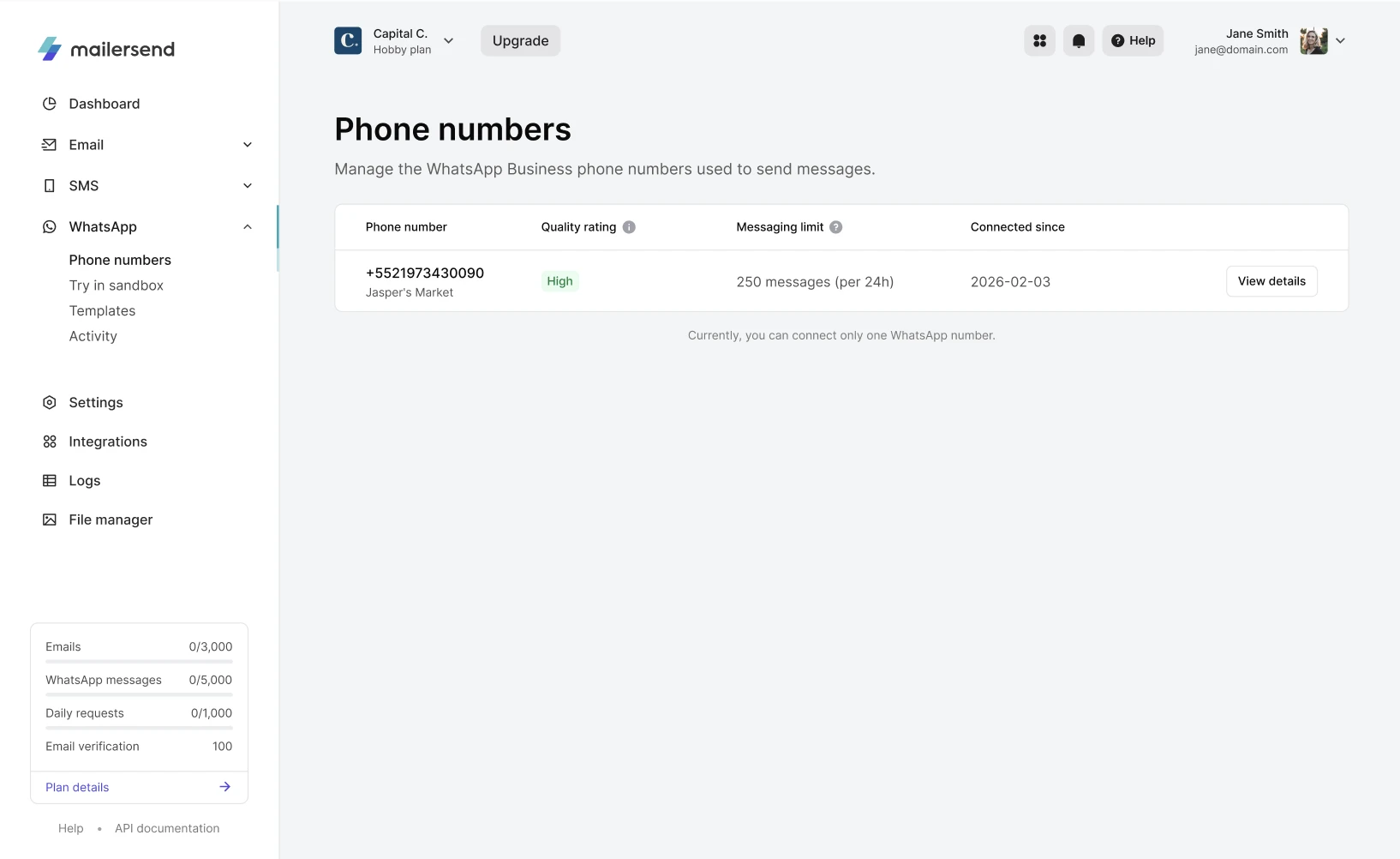
Getting a new number ensures you start from a clean slate, which matters because using a number previously flagged for spam on any messaging platform means starting with a damaged reputation before you've sent a single message.
Be aware that once a number is registered with the WhatsApp Business API, it can't be used simultaneously with the regular WhatsApp app.
4. Create your templates
One of the most important tasks is setting up your message templates. Getting this right is essential, as all outbound messages require pre-approved templates that Meta directly reviews, and Meta can reject templates, which can slow down your setup.
Increase the chances of your templates being accepted by understanding the different types of templates and not mixing different kinds of content, for example, adding marketing content to a transactional message.
To help you get approved fast, MailerSend has a library of 147 pre-approved multilingual templates. While these still need to be submitted to Meta, the fact that they are pre-approved means they have a very high chance of acceptance.
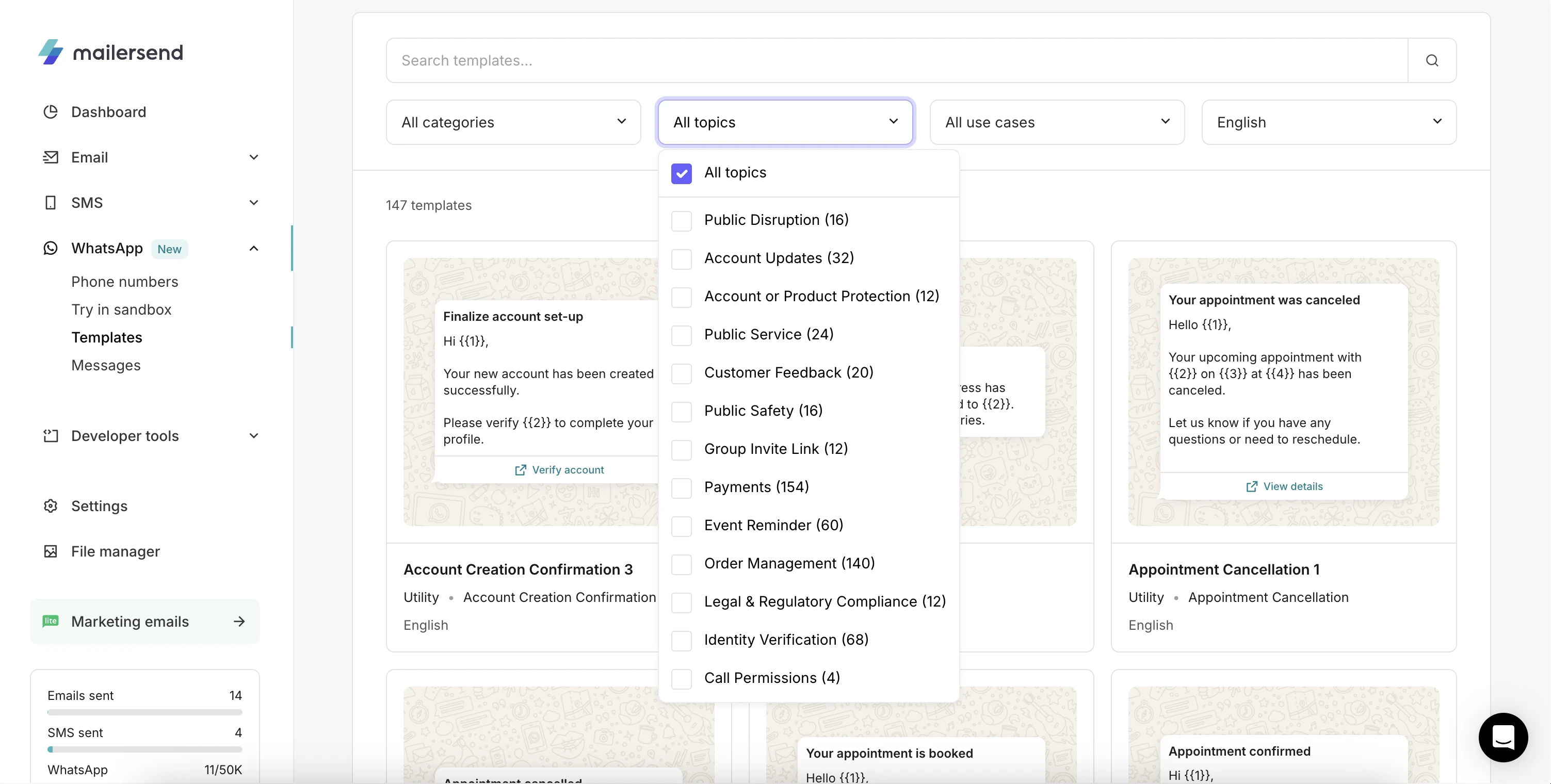
These templates cover many transactional use cases, including order confirmations, OTPs, and payment reminders.
Or, if you already have templates in Meta, they sync to your MailerSend account automatically. Approval status and quality score are visible from the MailerSend templates page, so you're not context-switching between dashboards.
5. Consider using rich media
One of the biggest benefits of WhatsApp templates over SMS is that you can add rich media to your messages.
This could mean attaching an image of the product a customer just ordered, a PDF invoice they can save directly to their phone, or a short video walkthrough for onboarding.
You can also add interactive buttons that link to external services. For example, to let recipients confirm a delivery, track an order, or contact support without leaving the conversation.
Used well, rich media makes transactional messages more useful and more trusted. A shipping update that shows the product image and a one-tap tracking button is a better experience than a plain text notification.
6. Start sending slowly
Unverified WhatsApp accounts have a messaging limit of up to 250. Once verified, this will increase to 2,000. This is a WhatsApp limitation that applies to all new accounts.
Scaling then happens automatically up to 100,000 and even unlimited sends as you build your reputation.
The scaling is dependent on your quality rating and how many of your total messages you’ve used over the past 7 days.
This means you shouldn’t plan a high-volume launch on day one. Warm the account up gradually, the same way you would a new email sending domain.
7. Track account health and deliverability
Once you're in production, your ability to send messages isn't static, as Meta actively monitors account behavior and adjusts your permissions accordingly.
Every WhatsApp Business account has a Quality Rating that's either High, Medium, or Low, based on user feedback signals over the past seven days. The primary input is why and how many recipients are blocking or reporting your messages.
This rating is visible in MailerSend, and it has direct consequences: a sustained drop to Low quality triggers a status change to "Flagged," which limits your messaging tier.
If your status doesn't improve, Meta can disable outbound messaging entirely. Transactional senders are usually at less risk of having a low sending quality than those who send marketing messages, but you should still keep on top of how your recipients react to your messages.
8. Tracking the message lifecycle
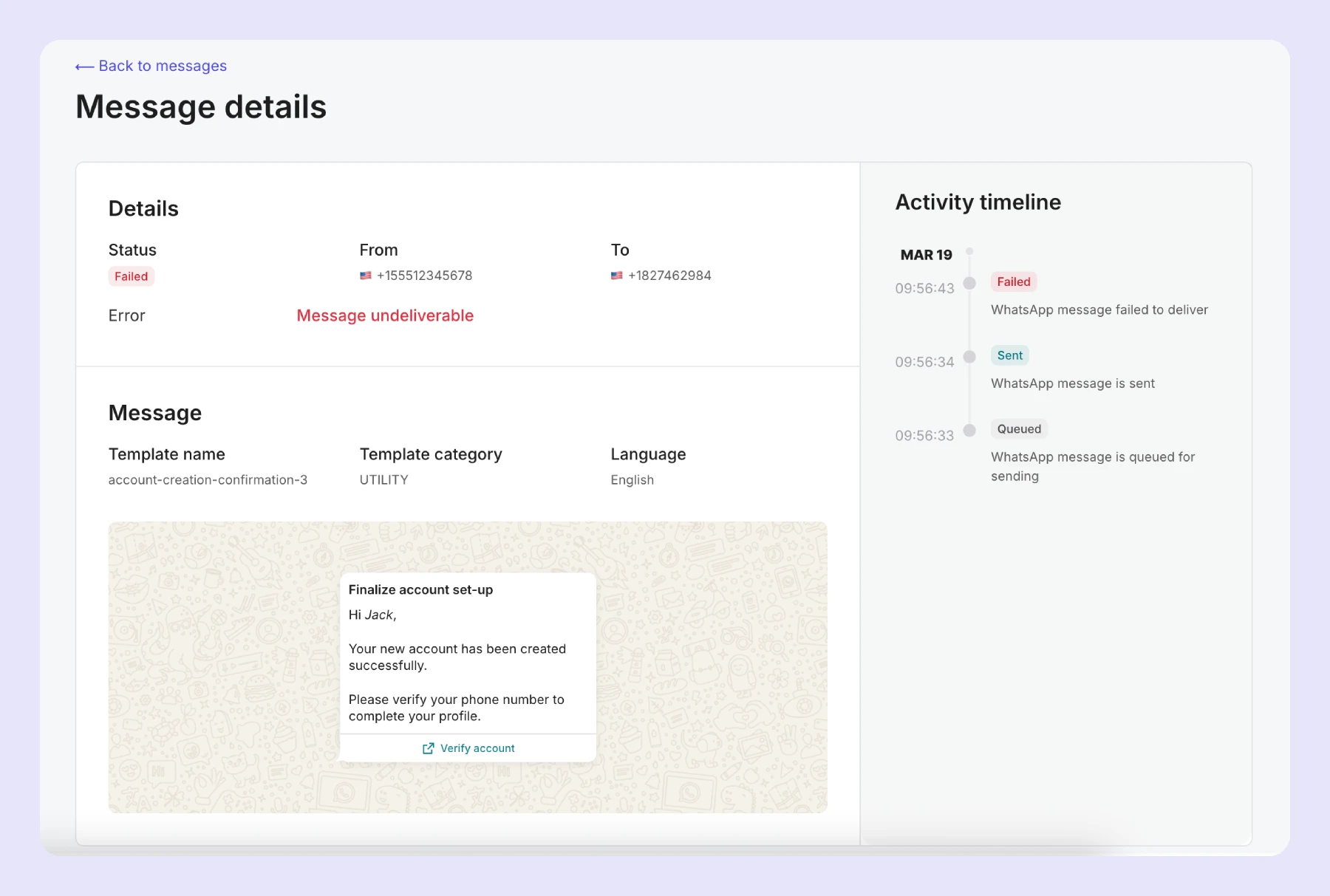
The WhatsApp Business API exposes four status states via webhooks: queued, failed, sent, and delivered.
This gives you insight into how your messages perform.
Queued: The message is in the queue to be sent
Failed: The sending has failed
Sent: The message has been sent
Delivered: The message has been delivered to the recipient
MailerSend surfaces all of this from a single activity dashboard. Every message has a full timeline showing its status from queued to delivered, with details including category, language, template used, and recipient.
How WhatsApp fits into a wider omnichannel strategy
WhatsApp shouldn't replace email and SMS—it should sit alongside them with a defined role.
A practical framework is to use WhatsApp for time-sensitive transactional messages where speed is important such as OTPs, shipping alerts, and appointment reminders.
Then, use email for messages that benefit from rich formatting, longer content, or a persistent inbox record (receipts, invoices, account summaries) and SMS as a fallback for users without WhatsApp or in regions with poor data connectivity.
Additionally, while WhatsApp's delivery guarantees are strong, no single channel is universal. Build fallback into your notification layer from the start, so that people who don’t have WhatsApp can still receive SMS.